
LeanArchitect
LeanArchitect is a tool for generating the blueprint data of a Lean project directly from Lean.
The blueprint is a high-level plan of a Lean project, consisting of a series of nodes (theorems and definitions) and the dependency relations between them. The purpose of LeanArchitect is to make it easier to write the blueprint by generating blueprint data directly from Lean.
Start by annotating definitions and theorems in Lean with the @[blueprint] tag. They will then be exported to LaTeX, which you may then put in the blueprint.
This tool is built to complement leanblueprint and its structure is inspired by doc-gen4. The idea is inspired by leanblueprint-extract.
Instructions
First, install leanblueprint and follow the instructions there to set up a blueprint project using leanblueprint new, if not already done. (See also instructions below for converting from an existing project.)
Add LeanArchitect to the lakefile. For example:
[[require]]
name = "LeanArchitect"
git = "https://github.com/hanwenzhu/LeanArchitect.git"
rev = "main"
To extract the blueprint for a module, first import Architect and then annotate key theorems and definitions in the file with @[blueprint]:
import Architect

@[blueprint "thm:my-theorem"]
theorem my_theorem : Foo Bar := by foo
(See also a full example below.)
Then input the extracted blueprint source to the blueprint document (typically, blueprint/src/content.tex):
% This makes the macros `\inputleanmodule` and `\inputleannode` available.
\input{../../.lake/build/blueprint/library/Example}

% Input the blueprint theorem `my_theorem`:
\inputleannode{thm:my-theorem}.

% You may also input an entire module:
% \inputleanmodule{Example.MyNat}
Then run:
# Generate the blueprint to .lake/build/blueprint
lake build :blueprint
# Build the blueprint using leanblueprint
leanblueprint pdf
leanblueprint web
If you see LaTeX errors here, you may need to manually fix some LaTeX content so that the extracted node compiles.
Example
This example is hosted at LeanArchitect-example. Consider the following MyNat API:
-- Example/MyNat.lean

import Architect

@[blueprint]
inductive MyNat : Type where
  | zero : MyNat
  | succ : MyNat → MyNat

namespace MyNat

@[blueprint "def:nat-add"
  (statement := /-- Natural number addition. -/)]
def add (a b : MyNat) : MyNat :=
  match b with
  | zero => a
  | succ b => succ (add a b)

@[simp, blueprint
  (statement := /-- For any natural number $a$, $0 + a = a$,
    where $+$ is \cref{def:nat-add}. -/)]
theorem zero_add (a : MyNat) : add zero a = a := by
  /-- The proof follows by induction. -/
  induction a <;> simp [*, add]

@[blueprint
  (statement := /-- For any natural numbers $a, b$,
    $(a + 1) + b = (a + b) + 1$. -/)]
theorem succ_add (a b : MyNat) : add (succ a) b = succ (add a b) := by
  /-- Proof by induction on $b$. -/
  sorry

@[blueprint
  (statement := /-- For any natural numbers $a, b$,
    $a + b = b + a$. -/)]
theorem add_comm (a b : MyNat) : add a b = add b a := by
  induction b with
  | zero =>
    have := trivial
    /-- The base case follows from \cref{MyNat.zero_add}. -/
    simp [add]
  | succ b ih =>
    /-- The inductive case follows from \cref{MyNat.succ_add}. -/
    sorry_using [succ_add]  -- the `sorry_using` tactic declares dependency

-- Additional content omitted

end MyNat
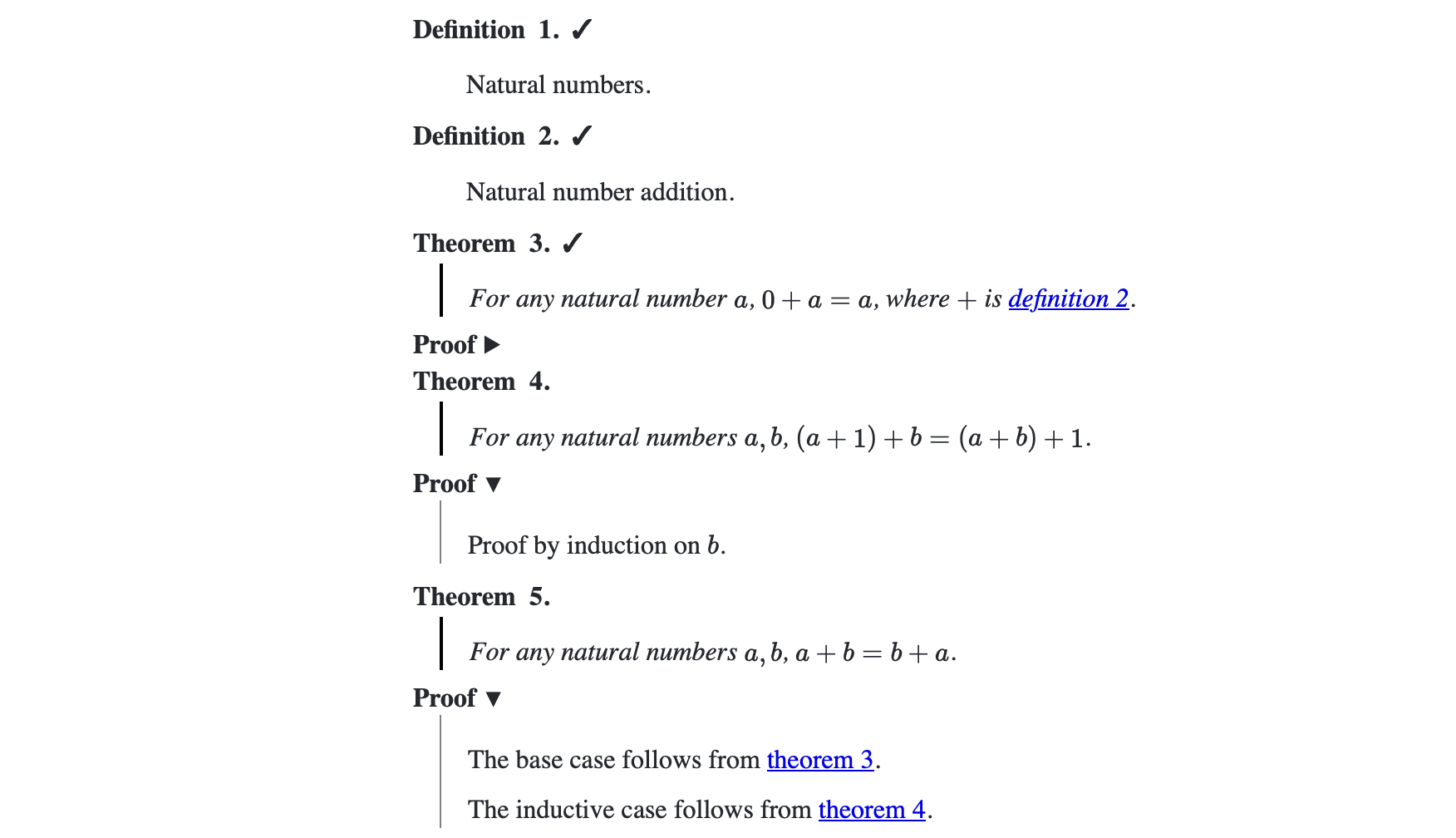
The (automatic) output of the above example Lean script is:
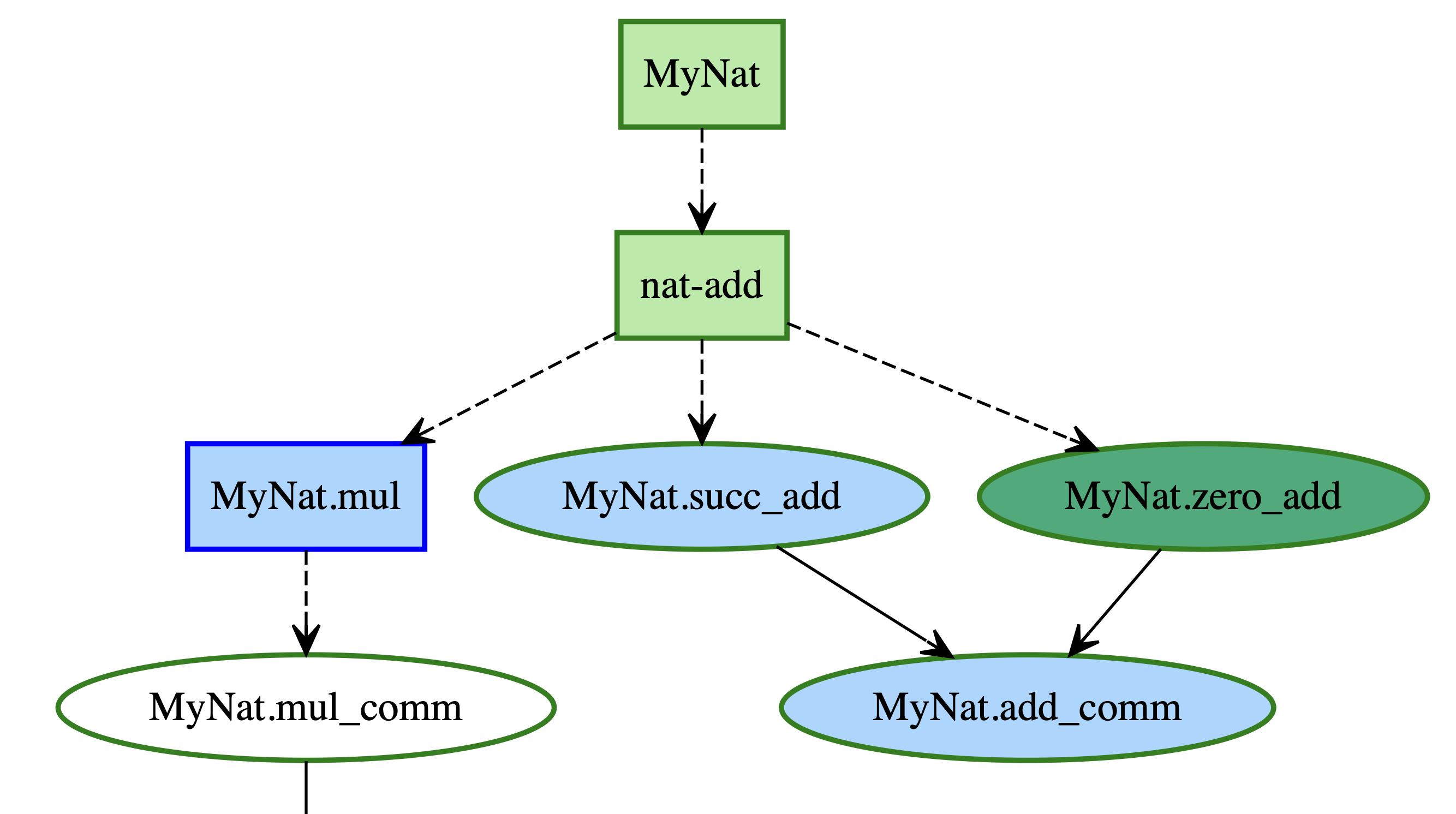
With dependency graph:
Specifying the blueprint
After tagging with @[blueprint], LeanArchitect will:
- Extract the statement and proof of a node from the
@[blueprint]annotation and docstrings in the tactic proof. - Infer the dependencies of a node from the constants used in the statement or proof.
- Infer whether the statement or proof is ready (i.e.
\leanok) from whether it is sorry-free.
You may override the constants used in the statement or proof with the uses and proofUses options, or with the using tactic.
To view the extracted blueprint data, use #show_blueprint or #show_blueprint theorem_name.
The supported options of @[blueprint] are:
@[blueprint
  "latex-label"             -- The LaTeX label to use for the node (default: Lean name)
  (statement := /-- ... -/) -- The statement of the node in LaTeX
  (hasProof := true)        -- If the node has a proof part (default: true if the node is a theorem)
  (proof := /-- ... -/)     -- The proof of the node in LaTeX (default: the docstrings in proof tactics)
  (uses := [a, "b"])        -- The dependencies of the node, as Lean constants or LaTeX labels (default: inferred)
  (proofUses := [a, "b"])   -- The dependencies of the proof of the node, as Lean constants or LaTeX labels (default: inferred)
  (title := /-- Title -/)   -- The title of the node in LaTeX
  (notReady := true)        -- Whether the node is not ready
  (discussion := 123)       -- The discussion issue number of the node
  (latexEnv := "lemma")     -- The LaTeX environment to use for the node (default: "theorem" or "definition")
]
Mixing informal and formal blueprints
At the start of a project, theorems or definitions are usually written only in LaTeX, and their statements are not ready to be formalized in Lean. LeanArchitect supports mixing such informal nodes written in LaTeX with formal nodes written in Lean. Typically, the workflow of an entire project may look like this:
- Write a blueprint in LaTeX
- Set up a new Lean project with this blueprint
- Formalize a theorem
my_theoremfrom LaTeX into Lean, and tag it with@[blueprint] - Replace this theorem in LaTeX with
\inputleannode{my_theorem}, and return to (3)
One utility script for automating the conversion is:
# Convert from a LaTeX node that has a Lean corresponding part (i.e. with `\lean`)
# to a `\inputleannode` command, and try to automatically tag the Lean part with
# `@[blueprint]`.
lake script run blueprintConvert --nodes <label of node>
Converting from existing blueprint format
With a project that uses the existing leanblueprint format, there is a Python script that tries to convert to the LeanArchitect format.
Currently, this script depends on a recent version of Python with loguru and pydantic installed (install by pip3 install loguru pydantic).
First go to a clean branch without any uncommitted changes, to prevent overwriting any work you have done.
You can then convert to LeanArchitect format by adding LeanArchitect as a dependency to lakefile, run lake update LeanArchitect, ensure leanblueprint checkdecls works (i.e. all \lean are in Lean), and then run:
lake script run blueprintConvert
Note that this conversion occasionally ends in some small syntax errors.
Please attend to the warnings in the output of the conversion script above. They might be caused by an incomplete or nonstandard blueprint and may cause further problems in the pipeline.
The conversion will remove the \uses information in LaTeX and let LeanArchitect automatically infer dependencies in Lean, unless the code contains sorry (in which case uses := and proofUses := will be added). If --add_uses is specified then all \uses information is retained in Lean by uses := and proofUses :=.
You may use --blueprint_root <root> to specify the path to your blueprint, if it is not the default.
See lake script run blueprintConvert -h for all options.
GitHub Actions integration
If building the blueprint is part of the GitHub CI action, then you need to run lake build :blueprint before building the blueprint,
so that the \input line above works. Here are some typical examples for doing this:
- If you use
.github/workflows/blueprint.ymlfrom leanblueprint, then add the following step:
      # Before "Build blueprint and copy to `home_page/blueprint`":
      - name: Extract blueprint
        run: ~/.elan/bin/lake build :blueprint
- If you use
.github/workflows/build-project.ymlfrom LeanProject, then add thisbuild-argsoption toleanprover/lean-action:
      - name: Build the project
        uses: leanprover/lean-action@...
        with:
          use-github-cache: false
          build-args: :blueprint
Extracting nodes in JSON
To extract the blueprint nodes in machine-readable format, run:
lake build :blueprintJson
The output will be in .lake/build/blueprint.
Usage details
Multiple Lean declarations
Multiple Lean declarations may correspond to the same node in the blueprint, by specifying the same label as:
@[blueprint "thm:a"] theorem a_part_one : ...
@[blueprint "thm:a"] theorem a_part_two : ...
The output will use \lean{a_part_one, a_part_two}, and \leanok only if both a_part_one and a_part_two are sorryless, and the \uses will also be merged.
A special case is for to_additive pairs of theorems:
@[to_additive (attr := blueprint "thm:b")] theorem b_mul : ...
should produce a single node with \lean{b_mul, b_add}.
Declarations upstreamed to Mathlib
When a result moves to Mathlib, you can no longer edit its source to add @[blueprint]. Instead, tag
it from your own project with the attribute command, reusing the original label so the node keeps
its place in the graph:
attribute [blueprint "thm:my-result" (statement := /-- ... -/)] Mathlib.Path.To.my_result
Put this just before the first local node that depends on it, or in the root module if nothing local does. Delete the old local copy in the same step.
A node is marked \mathlibok whenever all of its declarations resolve to a module under Mathlib,
Init, Std, Batteries, or Lean. This is read off the environment, not maintained by hand, so
the "already in Mathlib" status stays correct after every bump.
blueprintConvert applies the same rule during conversion: nodes imported from another project are
emitted as attribute [blueprint] node_name rather than a new @[blueprint] definition.
Weird highlight in VS Code
If you notice the syntax highlighting makes entire blocks of Lean code a wrong color, it is likely that somewhere in a LaTeX comment there is something like <a which is parsed by VS Code as an HTML tag. Simply change it to < a and the highlights should then be fixed.
Extracting entire Lean file to LaTeX
It is possible to convert an entire Lean file to LaTeX, by using \inputleanmodule in LaTeX,
which will convert all nodes in the order they are defined in Lean. For example:
-- Example.lean
@[blueprint (statement := /-- My definition. -/)] def my_def : ...
blueprint_comment /-- My comment about the definition. -/
@[blueprint (statement := /-- My theorem. -/)] theorem my_theorem : ...
Then in LaTeX \inputleanmodule{Example} will expand to
\begin{definition} \lean{my_def} My definition. \end{definition}

My comment about the definition.

\begin{theorem} \lean{my_def} My theorem. \end{theorem}
\begin{proof} ... \end{proof}
It is up to your design choice to use \inputleanmodule to have a blueprint that strictly follows the order in a Lean file,
or use multiple \inputleannode to include declarations individually for more flexibility.
Suppressing a dependency relation
If in Lean, @[blueprint] theorem B uses @[blueprint] theorem A, and you wish this not to appear in the dependency graph, then you may write:
@[blueprint] theorem A := ...
@[blueprint (proofUses := [-A])] theorem B := ...
Converting unformalized LaTeX nodes
In the blueprintConvert script, informal-only nodes (nodes without \lean) are by default not converted to Lean. You may add --convert_informal to blueprintConvert to convert them, which will output Lean declarations like @[blueprint] def my_def : (sorry : Type) := sorry and @[blueprint] theorem my_theorem : (sorry : Prop) := sorry in the Lean project.