
Natural Lean
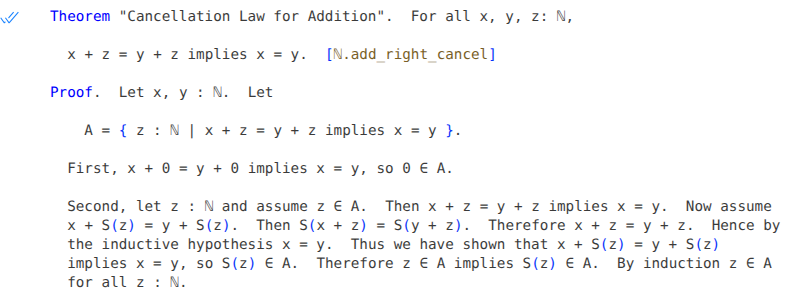
Natural Lean is a library that lets you write Lean definitions, theorems, and proofs in a controlled natural language that looks much like ordinary mathematical English. To use the library, you can simply write import Natural at the top of a Lean source file, then write natural-language mathematics freely in the rest of the file. If you are using an IDE such as Visual Studio Code, Natural Lean will automatically translate your text into native Lean code, which will be checked for correctness.
For a first glimpse of Natural Lean you could look at the example file NatNumGame.lean, which proves all of the theorems from the Natural Number Game. (Actually there are not many explicit proofs in this file, since Natural Lean's default tactic can solve most of these problems directly.) The file NatDef.lean is more substantial, and includes a partial development of the natural numbers from first principles in Natural Lean, including a number of theorems with proofs. (To see the full proofs in this file, you will want to turn on word wrap. As one possibility, download the file, view it in Visual Studio Code, and press Alt+Z to enable wrapping.) The Examples directory contains various further examples.
Natural Lean is in an early stage of development and is not a practical tool for writing many Lean proofs at this time: the grammar and expressiveness of the language are still quite limited. You may nevertheless want to experiment with Natural Lean even in its current state. Your feedback is welcome: you can send me email or open issues in this repository. I am actively developing the library and will be adding more features over time.
Contents
- Getting started
- Definitions
- Theorems
- Proofs
- Propositions
- Expressions
- Types
- Natural names
- Type classes
- Tactics
- Quotient types
- Visual Studio Code integration
- Hints and tips
(Tip: If you are viewing this document on GitHub's web site, you can also click the table of contents icon in the upper right to navigate through the various sections.)
Getting started
In your project's lakefile.toml file, write
[[require]]
name = "natural"
git = "https://github.com/medovina/natural_lean.git"
rev = "main"
At the top of any Lean source file in your project, write
import Natural
After that, you can mix natural-language mathematics with native Lean code freely in the same file.
Definitions
A definition begins with the capitalized word Definition.
Type definitions
A direct type definition defines a new type as definitionally equal to an existing type:
Definition. The type Set(α) is defined as α → Prop.
An inductive type definition defines a new type with one or more constructors:
Definition. The type ℕ is defined inductively with constructors 0 : ℕ and S : ℕ → ℕ.
A quotient type definition defines a new type that is isomorphic to equivalence classes of some existing type:
Definition.  The type ℤ is defined as the quotient Nat × Nat / ~.

Justification.  By ℤ.is_equiv.
As visible above, a quotient type definition must include a justification referencing a proof that the specified relation is indeed an equivalence relation. (See the section Type classes below for more on how to create such a proof.)
The section Quotient types below describes how to work with quotient types in more detail.
Function and constant definitions
A constant definition defines a numeric constant:
Definition. 1 : ℕ = S(0).
A direct function definition defines a function non-recursively, using a single formula. Currently the function must be a supported relational operator:
Definition. For all x, y : ℕ, x < y iff there is some z : ℕ such that x + S(z) = y.
You may write one or more Let declarations at the beginning of a direct definition. For example, the preceding definition may alternatively be written
Definition. Let x, y : ℕ. x < y iff there is some z : ℕ such that x + S(z) = y.
You may use pattern definition on the left side of a direct definition:
Definition. For all a, b, c, d : ℕ, (a, b) ~ (c, d) if and only if a + d = b + c.
A definition by cases defines a function recursively with one or more cases. Currently the function must be a supported arithmetic operator:
Definition.  The binary operation + on ℕ is defined recursively such that
  for all x, y : ℕ,

  a.  x + 0 = x.
  b.  x + S(y) = S(x + y).
Theorems
A natural-language theorem is introduced by the capitalized keyword Theorem (as distinguished from lowercase theorem, which begins a theorem in native Lean syntax). A theorem will typically have a name, which may appear either immediately after the word Theorem, or in brackets after the theorem statement. Thus, these two declarations are equivalent:
Theorem ℕ.succ_ne_self.  For all x : ℕ, S(x) ≠ x.

Theorem.  For all x : ℕ, S(x) ≠ x.  [ℕ.succ_ne_self]
I generally find the second style above to be more readable.
The keyword Lemma is a synonym for Theorem.
A theorem's name must be a valid Lean identifier and is its actual name in Lean. Additionally a theorem may optionally have a natural name, which may be any string and appears in quotes:
Theorem "Cancellation Law for Addition".  For all x, y, z: ℕ,

  x + z = y + z implies x = y.  [ℕ.add_right_cancel]
(At the moment a natural theorem name is just documentation; it's not possible to refer to it as a reason in a proof step.)
A theorem name in brackets may optionally be followed by a Lean attribute to attach to the theorem:
Theorem. For all x : ℕ, 0 + x = x. [ℕ.zero_add: @simp]
A theorem may or may not be followed by a proof. If a proof is not present, Natural Lean will attempt to prove the theorem using the default tactic. If a proof is present, it appears after the text Proof.:
Theorem.  For all x : ℕ, x < S(x).  [ℕ.lt_succ]

Proof.  Let x : ℕ.  x + S(0) = S(x).  Therefore x < S(x).
The section Proofs below describes the structure of proofs.
A theorem statement may optionally begin with any number of Let declarations introducing one or more quantified variables and/or Assume statements introducing assumptions. So the preceding theorem may alternatively be written as
Theorem.  Let x : ℕ.  x < S(x).  [ℕ.lt_succ]

Proof.  x + S(0) = S(x).  Therefore x < S(x).
Any Let declarations or Assume statements of this nature are automatically included at the beginning of a proof, unless the proof already begins with a Let declaration.
Theorem groups
Several theorems may appear together in a single theorem group:
Theorem.  Let x, y, z : ℕ.

  a. x ≤ x.  [ℕ.le_refl]
  b. If x < y and y ≤ z then x < z.  [ℕ.lt_of_lt_of_le]
  c. If x ≤ y and y < z then x < z.  [ℕ.lt_of_le_of_le]

Proof.

  b. Suppose that x < y ≤ z.  We know that y = z or y < z.  If y = z, then x < z.
    If y < z, then x < z by ℕ.lt_trans.

  c. Suppose that x ≤ y and y < z.  We know that x = y or x < y.  If x = y,
    then y < z.  If x < y, then x < z by ℕ.lt_trans.
In a theorem group, each theorem must have a label, such as "a", "b" or "c" above. The theorem group may have an associated Proof section containing labelled proofs for the theorems in the group. As in the example above, some theorems in the group might not have proofs.
The theorem group above begins with a Let declaration that is shared by all theorems in the group. Any free variables in each theorem's statement will automatically be universally quantified using the type in such a Let declaration. Thus, the theorem group above is equivalent to
Theorem.

  a. For all x : ℕ, x ≤ x.  [ℕ.le_refl]
  b. For all x, y, z : ℕ, if x < y and y ≤ z then x < z.  [ℕ.lt_of_lt_of_le]
  c. For all x, y, z : ℕ, if x ≤ y and y < z then x < z.  [ℕ.lt_of_le_of_le]

Proof.
  ...
In fact a theorem group may begin with any number of Let declarations or Assume statements, which will automatically be included at the beginning of each proof in the group, unless that proof already begins with its own Let declaration.
A label range such as a - c. indicates that several theorems in a theorem group share the same proof reason. For example,
Proof.
  a - c. By induction.
is the same as
Proof.
  a. By induction.
  b. By induction.
  c. By induction.
Corollaries
A theorem may be followed by one or more corollaries. A corollary is just like an ordinary theorem, except that if it has no proof, the preceding theorem is automatically applied as a proof reason. For example,
Theorem.  For all x, y, z : ℕ, if x < y and y ≤ z then x < z.  [ℕ.lt_of_lt_of_le]

Proof.  ...

Corollary.  For all x, y, z : ℕ, if x ≤ y and y ≤ z then x ≤ z.  [ℕ.le_trans]
is equivalent to
Theorem.  For all x, y, z : ℕ, if x < y and y ≤ z then x < z.  [ℕ.lt_of_lt_of_le]

Proof.  ...

Theorem.  For all x, y, z : ℕ, if x ≤ y and y ≤ z then x ≤ z.  [ℕ.le_trans]

Proof.  By ℕ.lt_of_lt_of_le.
Proofs
A proof consists either of the keyword By followed by a reason, or a series of proof steps.
A reason may be any of the following:
-
One or more theorem names, separated by
and, e.g.By ℕ.add_assoc and ℕ.succ_ne_self. -
The keyword
induction. -
An arbitrary Lean tactic in brackets, e.g.
By [simp +arith].
A proof step may be any of the following:
-
An assertion states a fact. It may be preceded by a word such as
So,Now,HenceorClearly, and may optionally include a reason introduced by thebykeyword. Examples:Clearly 0 ∈ B. Hence by induction y ∈ B for all y: ℕ. Then x < z by ℕ.lt.(In addition to the reasons listed above, an assertion in a proof by induction may use the reason
by the inductive hypothesis.)If an assertion leads to a contradiction, it may say so:
So x < x, contradicting ℕ.lt_irrefl. We have S(y) ≤ y, which is a contradiction to ℕ.lt_succ and ℕ.lt_trichotomy. -
A let declaration introduces one or more universally quantified variables of a given type:
Let x, y, z : ℕ. Let a : ℤ. -
A let definition introduces a variable and gives it a value:
Let x = 0. -
An assumption is expressed using the keyword
assumeorsuppose:Assume that v ∈ A. Suppose that z = 0 .Natural Lean will infer an assumption's scope heuristically unless it appears at the beginning of an if/otherwise block (as described below).
In addition, the following are compound steps that group proof steps together:
-
An if/then block introduces an assumption whose scope is limited to a single sentence:
If z = 0 then x = y, so x ≤ y.This is like
Assume that z = 0. Then x = y. So x ≤ y.except that the first form above restricts the assumption
z = 0to be active only through the assertionx ≤ y. -
An if/otherwise block allows a proof to consider two mutually exclusive possibilities. It may have either of these forms:
Assume A. (<proof_step>)+  Otherwise (<proof_step>)+  In either case B.

If A then <assertion>.  Otherwise (<proof_step>)+  In either case B.
Here is an if/otherwise block expressed using each of the forms above, which are equivalent:
Assume that x < y. Then there is some w : ℕ such that x + S(w) = y. Otherwise x = y, so x + 0 = y. In either case there is some z : ℕ such that x + z = y. If x < y then there is some w : ℕ such that x + S(w) = y. Otherwise x = y, so x + 0 = y. In either case there is some z : ℕ such that x + z = y. -
A biconditional block proves a statement of the form
P iff Q. It has this form:Assume P. (<proof_step>)+ Conversely, assume Q. (<proof_step>)+For example, here is a proof excerpt that proves that
x < S(x) iff x < S(y):Assume that x < S(y). If x > y then y < x < S(y), which is a contradiction to ℕ.discrete. So by ℕ.lt_trichotomy we have x ≤ y. Conversely, assume that x ≤ y. If x ≥ S(y) then by ℕ.le_trans we deduce that S(y) ≤ y, which is a contradiction to ℕ.lt_succ. So it must be that x < S(y). -
A cases block allows a proof to consider several mutually exclusive possibilities:
Case 1: v < y.  Then v + S(z) = y for some z : ℕ.  By ℕ.is_zero_or_succ either
  z = 0, or z = S(u) for some u : ℕ.  So S(v) < y or S(v) = y.

Case 2: v = y.  Then S(v) = S(y) = y + S(0).  So y < S(v).

Case 3: y < v.  Then v = y + S(u) for some u : ℕ.  Hence

    S(v) = S(y + S(u)) = y + S(S(u)).

  Thus y < S(v).

In all cases S(v) < y or S(v) = y or y < S(v).
Sequences of proof steps
In theory, you may write each proof step as a single sentence, with no extra words between steps:
Let z : ℕ.  Assume z ∈ A.  x + z = y + z implies x = y.
Assume x + S(z) = y + S(z).  S(x + z) = S(y + z).  x + z = y + z.
By the inductive hypothesis x = y.  x + S(z) = y + S(z) implies x = y.
S(z) ∈ A.
However this style feels wooden and unnatural, and is discouraged in Natural Lean. Instead, you may place filler words such as "so", "then", "therefore", "hence", "thus" and so on between steps. Furthermore, you may group multiple steps into a single sentence, separated by the words "and" or "so". For example, the proof steps above might be rewritten like this:
Let z : ℕ and assume z ∈ A.  Then x + z = y + z implies x = y.
Now assume x + S(z) = y + S(z).  Then S(x + z) = S(y + z).
Therefore x + z = y + z.  Hence by the inductive hypothesis x = y.
Thus we have shown that x + S(z) = y + S(z) implies x = y,
so S(z) ∈ A.
This sounds more like textbook mathematics, and illustrates the writing style for which Natural Lean is intended.
Declaring variables by assumption
As a notational convenience, you may write Suppose that x ∈ A without first declaring that the variable x exists. In other words, the Let statement is optional in this sequence:
Let x : Nat. Suppose that x ∈ A.
(This is especially convenient in inductive proofs, which often make this sort of assumption.)
Propositions
Each theorem asserts that a certain proposition is true, and every assertion step in a proof also contains a proposition. A proposition may have any of these forms:
<expr> <rel_op> <expr>
<prop> (,)? and <prop>
(either)? <prop> (,)? or <prop>
<prop> implies <prop>
<prop> iff <prop>
if <prop> then <prop>
for all (<var>),+ : <type> , <prop>
<prop> for all (<var>),+ : <type>
there exists (some | no) (<var>),+ : <type> such that <prop>
<prop> for some (<var>),+ : <type>
(at least | at most | exactly) one of (<prop>),+ is true
(this is | we have) a contradiction
Above <prop> is a proposition and <rel_op> indicates a relational operator such as =, ≠ or <. <expr> and <type> are expressions or types as described in the sections that follow.
Here are some examples of propositions:
x = 0
x + S(y) = S(x + y)
x < y and y < z implies x < z
for all x : ℕ, S(x) ≠ x
z ∈ A for all z: ℕ
there exists some y : ℕ such that x = S(y)
y = S(u) for some u : ℕ
at least one of x < y, x = y, y < x is true
Natural Lean follows the usual precedence for Boolean operators: and normally has the highest precedence, followed in turn by or, implies and iff. For example, x > 0 and y > 0 or z > 0 means (x > 0 and y > 0) or z > 0. However, a comma before and or orwill cause the operator to have a low precedence. For example, x > 0, and y > 0 or z > 0 means x > 0 and (y > 0 or z > 0).
In Natural Lean some relational operators look slightly different than in native Lean. Natural Lean uses ~ for an equivalence relation, whereas the native Lean symbol is ≈. Also, Natural Lean accepts either a vertical bar | or the division symbol ∣ to mean "divides", e.g. 3 | 12. Native Lean accepts only the division symbol, which looks similar to a vertical bar but is more difficult to type.
Operator chains
A proposition may contain chained relational operators: for example, x < y ≤ z = w has the same meaning as x < y and y ≤ z and z = w. In an assertion, each step in a chain may optionally have a reason:
z = (x + S(u)) + S(v)
  = x + (S(u) + S(v)) by ℕ.add_assoc
  = x + S(u + S(v)) by ℕ.succ_add.
Expressions
Expressions represent mathematical values. In Natural Lean an expression has any of the following forms:
<num>
<var>
<expr> <expr>       -- implicit multiplication
<expr> <op> <expr>
<expr> ( <expr> )   -- function call or multiplication
( <expr>, <expr> )  -- pair of values
( <expr> )
Above, <num> is a natural number constant and <op> is an arithmetic operator. At the moment Natural Lean includes only a small fixed set of these operators: the +, · and ^ operators, plus × which is a synonym for ·.
Here are some examples of expressions:
0
y
x + (y + z)
S(x + y)
a(b + c)
ac + bc
Implicit multiplication is supported: xy with no parentheses means x · y. Note that Natural Lean uses the traditional function call syntax f(x), which is different from f x as found in native Lean code. An expression of the form a(b) is potentially ambiguous: it may represent either a multiplication or a function call. Natural Lean resolves this ambiguity based on the type of a: if it is a function, then a(b) is considered to be a function call, otherwise a multiplication.
Any Lean keyword such as def cannot be used as an implicit product in Natural Lean. So if you want to compute the product of variables d, e, and f, you can write e.g. d · e · f or (de)f, but not def. Note that at is also a Lean keyword, so you must write a · t for the product of a and t. (I hope to remove this limitation at some future point.)
Unicode superscript digits and letters are supported, so you may write e.g. x² in place of x^2, or xʸ in place of x^y. A superscripted expression may include the + operator, so xⁱ⁺ʲ is the same as x ^ (i + j).
Types
At the moment any type in Natural Lean must be either a simple type such as Nat, a function type of the form α → β such as Nat → Nat → Nat, or a product type of the form α × β such as Nat × Nat.
Natural names
In Natural Lean, any simple type such as Nat or Int may have a natural name such as "natural number" or "integer". You may refer to a type either by its Lean name or its natural name. For example, the following statements are equivalent:
For all x : Nat, x < x + 1.

For all natural numbers x, x < x + 1.
In Visual Studio Code, if you hover the mouse over a natural name (such as "natural numbers" in the preceding statement) then a pop-up window will appear showing you the corresponding Lean type.
You can use an attribute to assign a natural name to a type that already exists in Lean:
attribute [natural type "natural number"] Nat
attribute [natural type "integer"] Int
In fact the preceding two attributes are predefined in Natural Lean, so you don't need to write them.
A natural name must consist of only one or two words, each of which must be at least two letters long (to help distinguish them from variable names).
When you define a new type in Natural Lean, you may give it a natural name as well as a Lean name:
Definition.  The type ℕ (the natural numbers) is defined inductively
  with constructors 0 : ℕ and S : ℕ → ℕ.
(This particular definition redefines the name "natural number" so that it refers to the inductive type that it is defining, rather than Lean's built-in Nat type.)
Type classes
It is not possible to define a type class in Natural Lean at this time. However, you may give a natural name to an existing type class using a natural attribute:
attribute [natural adjective "associative"] Std.Associative
attribute [natural adjective "commutative"] Std.Commutative
In fact the preceding two attributes are predefined in Natural Lean.
As visible above, the natural attribute takes an optional category (noun, verb, adjective, or type) for the word that is being defined. (If you do not specify a category, the default is noun.)
You may declare that an operator belongs to a type class, using the type class's natural name:
Theorem.  For all x, y, z: ℕ,

  (x + y) + z = x + (y + z).  [ℕ.add_assoc]

Proof. ...

Corollary.  The operator + is associative on ℕ.
Above, the word "associative" is the natural name of the Std.Associative type class, so this definition declares that the + operator belongs to that type class. As in this example, you will typically write this sort of statement as a collorary to a theorem. Then the theorem will be automatically be used to justify the type class declaration.
Natural Lean's default tactic uses grind, which notices which type classes operators belong to and can take advantage of this information. For this reason, it is often important to declare that operators belong to type classes such as Std.Associative and Std.Commutative.
Lean predefines some structure types that belong to Prop. These look something like type classes, but are not actually type classes. For example, the Equivalence structure represents an equivalence relation and is defined like this:
structure Equivalence {α : Sort u} (r : α → α → Prop) : Prop where
  refl  : ∀ x, r x x
  symm  : ∀ {x y}, r x y → r y x
  trans : ∀ {x y z}, r x y → r y z → r x z
In Natural Lean you may declare that an operator belongs to such a structure using the same syntax for type class declarations that was described above .
A type class may have multiple methods; similarly, a structure may have multiple fields. If you write a corollary declaring that an operator belongs to such a type class or structure, each method or field will automatically be matched with any theorem from the preceding theorem group whose name ends with the field name. This is a convenient way to prove a set of propositions that a type class requires. For example, we may write
Theorem.  Let h, i, j, k, m, n : Nat.

  a. (h, i) ~ (h, i).  [equiv_refl]
  b. If (h, i) ~ (j, k) then (j, k) ~ (h, i).  [equiv_symm]
  c. If (h, i) ~ (j, k) and (j, k) ~ (m, n) then (h, i) ~ (m, n).  [equiv_trans]

Corollary.  The operator ~ is an equivalence relation on Nat × Nat.
"equivalence relation" is the natural name of the Equivalence structure type. In the declaration above, the refl, symm and trans propositions in that structure will be proved by the theorems equiv_refl, equiv_symm and equiv_trans respectively.
Tactics
When an assertion does not contain a reason, or when a theorem does not include a proof at all, Natural Lean will attempt to prove the assertion or theorem using a tactic named default which tries each of trivial, grind and aesop in turn. In the future I intend to make the default tactic configurable by any development in Natural Lean, but for the moment it is fixed.
As described above, an assertion or theorem may have a reason indicating one or more named theorems:
But x + S(z) ≠ x by ℕ.not_succ_add and ℕ.add_comm.
In this situation Natural Lean will invoke the tactic default_apply with the given theorem names default_apply is a tactic that calls each of apply_rules, grind and aesop in turn, passing the given theorems as arguments. (I also intend to make this tactic configurable in the future.)
Quotient types
As described above you may define quotient types in Natural Lean. For example, we may define the integers ℤ as a quotient type whose underlying type is pairs of natural numbers under a certain equivalence relation ~:
Definition.  For all n, k, j, i : Nat, (n, j) ~ (k, i) if and only if n + i = k + j.

Definition.  The type ℤ is defined as the quotient Nat × Nat / ~.
If Q is a quotient type, then the notation Q[x] indicates a value of type Qthat is constructed from x, a value of the underlying type. In our example, the notation ℤ[(a, b)] indicates an element of ℤ constructed from the pair of naturals (a, b).
Using this notation you may write implicit function definitions on quotient types that refer to elements of the underlying type. (At the moment any such function must be an arithmetic operator supported by Natural Lean.) Any such definition must include a justification proving that the function definition is valid. Specifically, it must show that if a ~ b and c ~ d, then (a ∘ c) ~ (b ∘ d), where ∘ is the operator being defined and ~ is the equivalence relation used to define the quotient type.
For example, we might define the addition operation on the quotient type ℤ as follows:
Lemma.  Let n, j, k, i, n₁, j₁, k₁, i₁ : Nat.  If (n, j) ~ (n₁, j₁) and (k, i) ~ (k₁, i₁) then

  (n + k, j + i) ~ (n₁ + k₁, j₁ + i₁).   [ℤ.add_equiv]

Definition.  For all a, b, c, d : Nat, ℤ[(a, b)] + ℤ[(c, d)] = ℤ[(a + c, b + d)].

Justification.  By ℤ.add_equiv.
Proving theorems about quotient types
If we have a value x of some quotient type Q, in a proof we will sometimes want to instantiate one or more variables with values from the underlying type that could be used to construct x. Natural Lean includes a Let ... for some statement that can be used for this purpose. For example, suppose that we construct the integers ℤ as a quotient type from pairs of naturals as described above. If x has type ℤ, we may write
Let x = ℤ[(a, b)] for some a, b : Nat.
As a shortcut, in proving a theorem about a quotient type Q you may write By the definition of Q to ask Natural Lean to transform a theorem to an equivalent one involving the underlying type, which may then be proved using the default tactic. For example, if we define the integers as a quotient type as outlined above, we may then automatically prove that addition is commutative using this shortcut:
Theorem.  For all x, y : ℤ, x + y = y + x.

Proof.  By the definition of ℤ.
Visual Studio Code integration
You may notice that Visual Studio Code doesn't display a double checkmark beside natural-language theorems that have been proven. That's due to a bug in Lean. I have submitted a pull request that will fix it, so hopefully that will land soon.
When you first open a file with Natural Lean code, Visual Studio Code will display its default syntax highlighting, which colors many words in natural-language text:
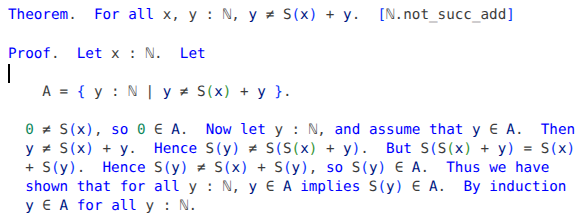
In my opinion this is not easy to read. As soon as you make any edit to the file, Natural Lean's own syntax highlighting will appear instead:
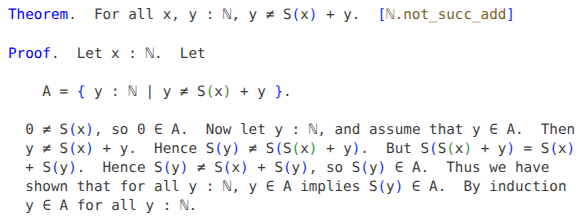
Instead of editing the file, you can alternatively produce the natural highlighting by switching to any other tab in the same editor pane, then switching back.
It would be nicer if the natural highlighting appeared as soon as you open the file, however a bug in Lean currently prevents this from happening.
Natural Lean's syntax highlighting shows natural-language text using the token type operator, which by default appears as pure black (in a light theme) or pure white (in a dark theme). In my opinion this is a bit too strong. To dim the text a bit, include this in your settings.json file:
    "editor.semanticTokenColorCustomizations": {
        "[*Light*]": {
            "rules": {
                "operator:lean4": "#3B3B3B"
            }
        }, "[*Dark*]": {
            "rules": {
                "operator:lean4": "#C4C4C4"
            }
        }
    },
(It would be nicer to have a separate token type such as natural for natural-language text, however Lean does not allow a library to add custom token types, so we fall back on operator instead.)
When working with Natural Lean, you might even want to configure Visual Studio Code to display your text in a variable-width font, e.g. like this:
"[lean4]": {
    "editor.fontFamily": "'DejaVu Sans', Sans",
    "editor.fontSize": 13,
},
In my opinion this is the nicest way to view and edit natural-language mathematics. However the setting above will also cause all code in any Lean file to be displayed in variable width, which may not be ideal.
Hints and tips
Proving steps
The try? tactic is very useful. If a proof step fails, try adding by [try?]to that step. If that succeeds, the information in the InfoView may reveal which theorem(s) you will need to use to prove the step without try?. For example, if the InfoView shows
Try these:
  [apply] grind only [Nat.eq_one_of_mul_eq_one_left]
  [apply] grind => instantiate only [Nat.eq_one_of_mul_eq_one_left]
then you should be able to prove the step by writing by Nat.eq_one_of_mul_eq_one_left, since Natural Lean's default_apply tactic will call grind.
On the other hand, try? may report a large number of theorems to use:
Try these:
  [apply] grind only [instLEℕ.le_spec_1, ℕ.add_right_cancel, ℕ.lt_of_add_lt_add_right,
  ℕ.lt_trichotomy, ℕ.add_lt_add_right, ℕ.lt_trans, #187d]
Then you might be able to prove the step by writing by followed by a list of all of those theorems . However, that seems awkward: the whole point of Natural Lean is that proofs should be readable, and it may not be clear how the theorems in a list such as this can be combined to prove the step. So in this situation it may be better to break the step into smaller steps, producing a readable proof.
Grammar
Natural Lean is currently quite lax about plurals, articles, and capitalization, so at the moment you may be able to get away with writing ungrammatical English such as "Let a and b be natural number". I plan to check grammar more strictly in the future.
Debugging
If you would like to see the Lean code that is generated from any definition or theorem in Natural Lean, write set_option trace.natural true in immediately before the definition or theorem. The Lean code will be visible in the InfoView window in Visual Studio Code.
Note that you cannot write set_option immediately before a corollary. That's because a corollary is parsed together with its preceding theorem as a single unit. Instead, write set_option before the theorem, and then the InfoView window will show you the Lean translation both of the theorem and of any corollaries that follow it.
When Natural Lean translates a natural-language proof into native Lean, as a first step it infers a tree structure for the proof, which determines the scope of every variable introduced in the proof. To see this structure, write set_option trace.natural.tree true in immediately before a theorem. Sometimes this can be helpful in debugging to check that the inferred structure makes sense.