


AI memory. Fewer tokens.
Reuse prior work across independent AI agent chats, with local memory and no LLM calls to organize it.



Get the plugin · Install · Try it yourself · Watch the demo · How it works · Evidence · Controls · Privacy
Eggshell is local memory that helps AI agents use fewer tokens. It turns work from one chat into reusable evidence for the next: repository searches, commands, documentation findings, and conclusions. Carry useful work into a new chat and avoid repeating an investigation you have already done.
Memory is built and organized locally, without LLM calls or additional billed tokens for memory management. Your agent still consumes normal task and handoff tokens. See the measured token savings and their scope.
Why a graph of evidence?
A useful memory needs more than a previous answer. It needs the observations that support that answer, the conditions under which it holds, and a way to find the relevant parts when the next question is different.
Eggshell keeps those connections in a graph of original work and evidence. Local semantic search finds related work; graph traversal brings in its supporting tool results, source locations, and necessary context. The handoff preserves selected original passages and their relationships without additional LLM calls to summarize or organize memory. Code, natural language, documents, and command output use the same structure.
The combination is the core of Eggshell: semantic retrieval, connected evidence, immutable history, and reusable graph calculations, implemented with Lean contracts. Saved work stays inspectable, while indexed, bounded reads let the engine retrieve context without reconstructing the entire memory for each search. How it works explains the design.
Same task. Two new chats. Compare token use — 30 seconds.
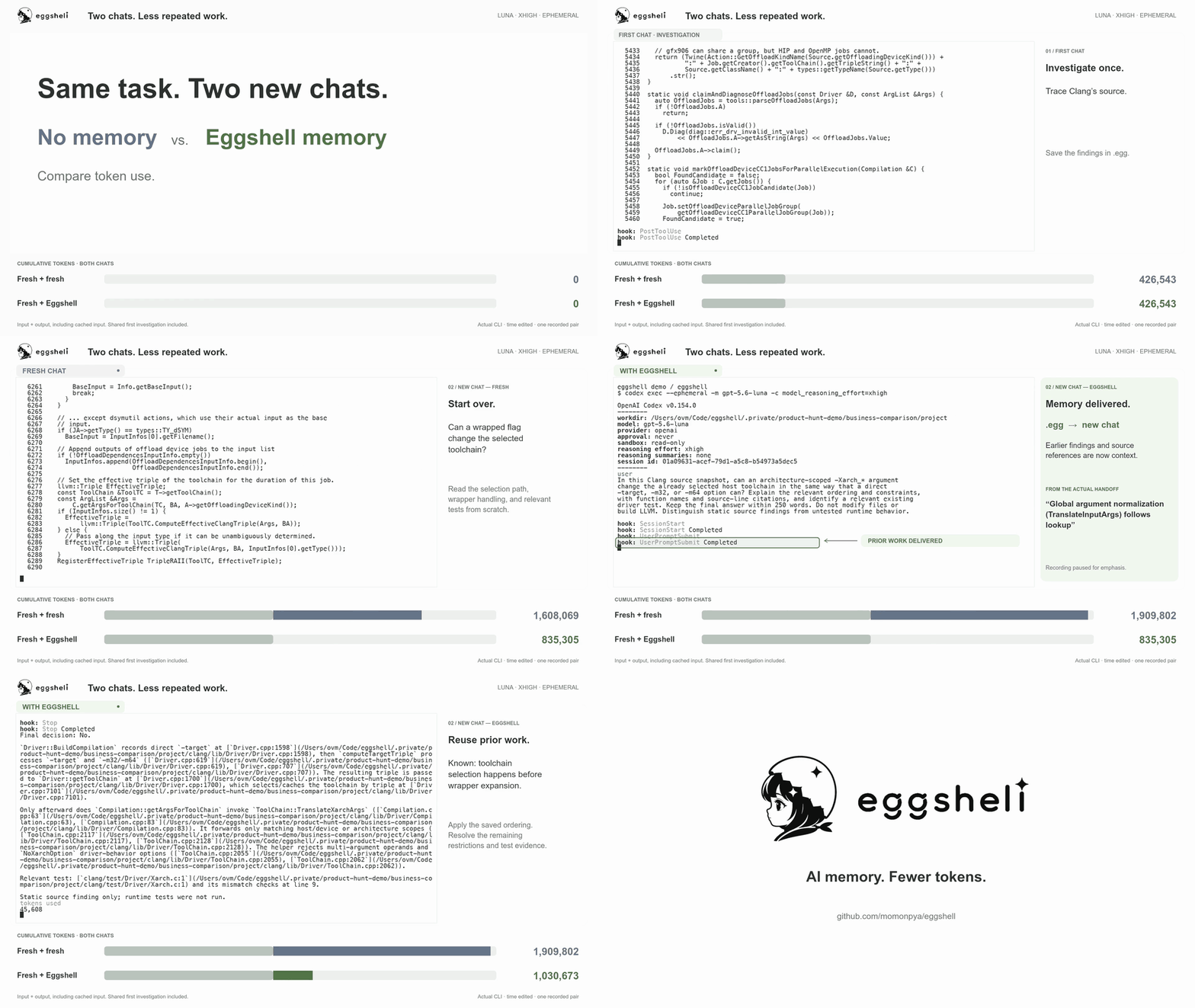
Actual Codex CLI, Luna xhigh, independent ephemeral chats on an earlier build. In this recorded pair, Eggshell used 81.8% fewer input + output tokens in the second chat; both answers passed static source review. One pair, with time edited for clarity. Full-resolution video and measurement details · Try it in two chats.
Use the published Codex plugin, or the separate, experimental adapters for Claude Code, Gemini CLI, Cursor, and OpenCode. The adapters use the same memory engine and are built and installed separately. They have automated engine integration tests; live agent sessions and token savings have not yet been evaluated for those four clients.
Install
For Claude Code, Gemini CLI, Cursor, or OpenCode, follow the adapter installation guide. The steps below install the Codex plugin.
You need macOS or Linux on Apple Silicon/ARM64 or x86-64, Python 3, and the Codex
CLI available as codex. Your Codex client must support plugins and command
hooks. Setup downloads the Eggshell binary and a local search model.
- Install the plugin, then ask Codex: “Set up Eggshell for this project.” Setup installs the runtime and search model and prepares the project, preserving existing settings.
- Enable it in
/hooks, then start a new chat in the project. - Check the startup message: “Eggshell session hook connected”. Run
!egg doctorto check setup. If the message is absent, check/hooks. Complete the two-chat example and use!egg graphto confirm that saved work reaches the follow-up.
After initial setup, recording and relevant handoffs are automatic; ordinary tasks need no special prompts. Missing setup produces a startup notice once the hooks are trusted. This integration requires Codex command hooks; ordinary ChatGPT Chat does not provide automatic Eggshell memory.
Install from a terminal instead
curl --proto '=https' --tlsv1.2 -fsSL \
  https://raw.githubusercontent.com/momonpya/eggshell/main/install.sh | sh
export PATH="${EGGSHELL_PREFIX:-$HOME/.local}/bin:$PATH"
cd your-project
egg init
The installer checks the release checksum, installs the plugin and egg
command, and prepares local search. Add the same PATH setting to your shell
configuration if needed. In Codex, review and enable Eggshell's hooks through
/hooks, then start a new chat in the project.
egg init creates .eggshell.toml and configures .eggs/work.egg, the project's
local memory database. It is stored as a directory with
an append-only page file and a committed head. The .eggs directory is ignored
by Git. The database appears when the first turn is saved.
Try it in two chats
Use the small public sample for copyable task prompts, baseline tests, and checkpoints for saved work and the delivered handoff. It needs no private repository. To try Eggshell in your own project:
- In a Codex chat in the initialized project, ask a real investigation question, such as “Find how configuration is loaded and identify the relevant tests.”
- Let Eggshell save tool results as the investigation progresses and the final
answer when the turn stops.
!egg keepcan explicitly flush the finished turn. - Open a separate Codex chat in the same project and ask a related follow-up, such as “Which tests should change if we add a new configuration option?”
- Run
!egg graphto inspect the prior work that was actually sent to Codex.
The leading ! runs an Eggshell control command in Codex without a model turn.
In a terminal, use egg init or egg uninstall codex without the !.
Tell us how your first run went— whether it worked or stopped at setup, saving, or delivery. A short report helps us improve the steps that get in your way.
Eggshell journals each tool result before searching for related work. A separate
writer saves those observations to .egg while the turn is still running; the
final answer is saved when the turn stops. Interrupted writes remain queued and
retry automatically. !egg keep can explicitly save a finished turn; !egg drop
clears the active turn without removing saved observations or queued commits.
For reading multiple memory databases, custom install locations, and troubleshooting, see the Plugin guide.
How it works
- Save original observations. Hooks journal tool results during the turn. An independent writer adds immutable work and outcomes to the local page database, with chunked bodies, source records, and search indexes.
- Search the index, follow the graph. Local MiniLM and text rankings find related work. Eggshell ranks the original evidence in its supporting graph before spending the body-read budget. It loads selected context rather than rebuilding the entire saved graph for every hook.
- Reuse checked calculations. Persisted dependencies cover positive hits, missing keys, ranges, and original body references. Rankings and graph calculations can be reused when those dependencies agree; a new matching record or changed source can invalidate the relevant cached result.
- Deliver useful evidence. Eggshell selects original passages and supporting graph context for the current question within a bounded handoff. It keeps source locations, conditions, and exceptions with the relevant explanation, and avoids resending passages already delivered in the visible chat context.
Eggshell checks the recorded local file dependencies before reuse. Changed or deleted files do not rewrite the original observation: its earlier contents remain history, and confirmed new contents become separate observations. Workspace-relative paths and content fingerprints support moving memory between checkouts. A matching file name alone cannot certify an external or MCP result.
The design follows three principles:
- Preserve evidence. Original observations remain unchanged. New contents and corrections are separate records, with their own source and conditions.
- Reuse only applicable work. Similarity finds useful context; recorded dependencies determine whether local evidence still applies. The agent uses checked evidence and investigates only facts missing from the current request.
- Keep users in control. Memory stays local, recording can be disabled, and the exact delivered context and its selection can be inspected.
Search and graph processing run locally. Eggshell does not ask an LLM to write summaries, classify memories, or maintain the graph. Selected memory and the agent's subsequent work still consume the model's normal input and output tokens. The engine, adapters, retrieval selection, setup logic, and package builder are written in Lean. Python is confined to FastEmbed inference and the existing NumPy numerical kernels; it does not organize memory or select handoffs. See verified contracts and runtime boundaries. See the architecture reference for matching, graph operations, and the Lean core.
Control and inspection
Run these inside the relevant Codex chat:
!egg                  show active settings and staged turn
!egg keep             save the staged turn now
!egg drop             clear the active turn (saved work is retained)
!egg diff             preview what would be saved
!egg graph            show the exact handoff sent to Codex
!egg why              explain the handoff selection
!egg inspect          show resolved storage paths
!egg doctor           check setup without changing settings or memory
!egg off              disable memory and clear the active turn (saved work is retained)
!egg on               enable memory again
!egg next private     read memory without saving the next turn
!egg next off         disable memory for the next turn
Profiles specify which memory databases can be read and where new work is saved.
The default work profile reads and writes the project's memory. private
is read-only; it still sends relevant saved work to Codex. off disables both
recording and handoffs. More controls and configuration.
Evidence
From a new seed to three investigations, then reuse
On 2026-10-10, we compared three related Clang Driver investigations using native macOS Codex CLI, GPT-6 Luna, xhigh, independent ephemeral chats:
- A target/language edge case and its test boundary.
- Public APIs, configuration, downstream effects, and a minimal additional test.
- The interaction of
--target,-x, and-fsyntax-onlythrough job construction.
The memory-assisted sequence started empty, recorded a new seed investigation, then ran topics 1 → 2 → 3. Each topic's tool results and answer were saved and indexed before the next chat. The second lap repeated 1 → 2 → 3 using that accumulated memory, continuing to save throughout. Fresh answers were never imported into memory.
Each fresh reference was an independent chat without Eggshell memory, recorded earlier on the same day with the same question, LLVM snapshot, native CLI, model, and reasoning setting. There is one fresh reference per topic, reused for both reduction columns.
| Topic | Fresh tokens | First lap | Reduction | With accumulated memory | Reduction |
|---|---|---|---|---|---|
| 1 | 1,284,909 | 224,815 | 82.5% | 52,029 | 96.0% |
| 2 | 799,753 | 170,441 | 78.7% | 52,007 | 93.5% |
| 3 | 2,302,471 | 657,499 | 71.4% | 52,189 | 97.7% |
| Total | 4,387,133 | 1,052,755 | 76.0% | 156,225 | 96.4% |
Tokens are input + output, including cached input; reasoning is included in output. Each reduction uses the corresponding fresh reference. All seven new memory-side chats completed; there were no failed attempts to exclude. The new seed cost 766,235 tokens, separate from the follow-up table. Seed plus both assisted laps consumed 1,975,215 tokens. Memory organization itself used no LLM calls. This is one initial sequence and one retained-memory sequence, without control over model randomness; it is not a general savings guarantee or a statistical comparison.
Answer review: a static source audit found that the assisted answers addressed the questions and preserved the target, input, phase, and job construction boundaries. Minor corrections to a proposed test fixture and source links are documented alongside the unedited answers in the measurement record. The review was performed by one reviewer without blinding. The snapshot had no verified LLVM build, so runtime tests and statistical quality equivalence were not established.
Hook performance: the slowest hooks were 17.3 seconds in the first lap and 23.6 seconds in the second, within the 30-second deadline. No timeout or incomplete initial handoff occurred. Each answer was persisted and indexing completed before the next topic, and all earlier observations remained intact. The retained-memory lap required zero additional tool executions across all three topics. Peak memory was not measured.
The measurement record includes exact
prompts, token counts, timings, delivered packets, persistence checks,
answers, and source-review notes. It identifies Eggshell commit 237058c
and LLVM commit 6dfe1677ab8dffbc6ec13d53a1e0215d75147689.
See verified contracts and their boundaries for what
Lean proves independently of these measurements.
Privacy
Eggshell has no hosted service, telemetry, or account system. Saved work, embeddings, and search processing stay on your machine. Selected prior work is passed to your agent as model input and is handled under the settings and terms of its model provider, just like other context in the chat.
Installation downloads the release, Python dependencies, and MiniLM model. Work files may contain prompts, source code, and tool results; choose carefully which files a project can read. Read-only mode prevents saving new work but does not prevent sending existing memory to the agent.
See PRIVACY.md for storage locations, network behavior, and removal. Report vulnerabilities through the private channel in SECURITY.md.
Development
Source builds use the toolchain pinned in lean-toolchain.
lake build eggshell eggshell_tests
EGGSHELL_DATA_ROOT="$PWD/.lake/eggshell-tests-data" \
  .lake/build/bin/eggshell_tests
To install a source build:
lake build eggshell
EGGSHELL_PREFIX=/absolute/install/root \
  .lake/build/bin/eggshell install codex
export PATH="/absolute/install/root/bin:$PATH"
egg init
See CONTRIBUTING.md before changing the persistent graph or making performance claims. Brand assets are documented in docs/brand.md.
Eggshell is pre-release software. Persisted data created by an incompatible development checkout may be rejected rather than silently reinterpreted.
License
Licensed under Apache-2.0.